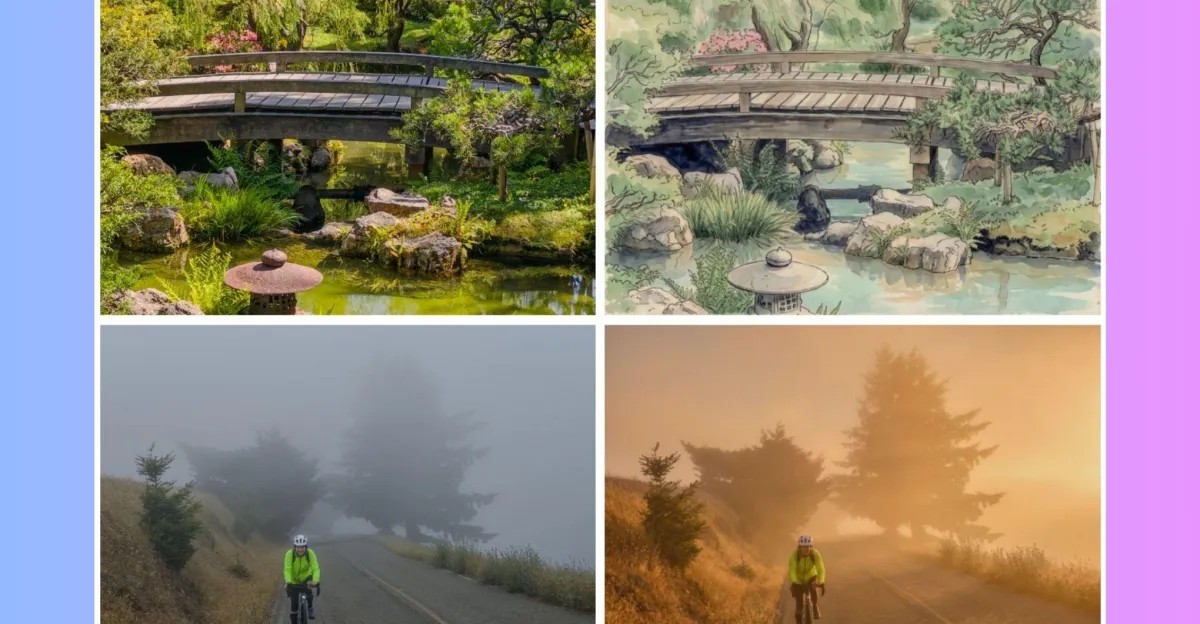
Adobe’s experimental mobile photography app, Indigo, just got a lot more complicated. The app started out promising something very specific. A natural look. One that mimicked the feel of shooting with a high-end SLR camera. That’s it. Now, it includes a suite of generative AI editing tools. And yes, it uses third-party models, not Adobe’s own Firefly engine.
The feature set is called the “AI Playground.” It’s currently an experiment. Adobe is testing it with a small slice of users who have version 1.1 installed. You don’t even need to sign in. Free access is the hook. But there’s a catch. You can opt out with a single button press. Use the app exactly as before. No forced changes. No AI interference if you don’t want it.
Marc Levoy, a fellow at Adobe, put it bluntly. They are trying to figure out if people actually want generative AI inside a camera app designed for manual control. If the data looks good, they might expand the user base. If it flops, they might kill it. If it takes off? Eventually, a paid version will follow.
How does Indigo’s new AI Playground work?
The update brings four distinct sections. Each one relies on engineered prompts. You don’t type long instructions for most features. You tap buttons or toggle switches. Here is how each part functions.
Styles applies preset effects. Think of them as heavy-handed filters. One click turns a photo into something resembling an illustration. Another shifts the lighting entirely. It’s preset-based. Limited control.
Object Editing removes distractions. People. Poles. Trash. You select the item, the AI deletes it, and then fills in the background. It’s similar to Google’s Magic Eraser. It works. It’s useful.
Photo Guidance gives feedback. The AI analyzes your composition and suggests changes. Maybe move your foot forward. Adjust the ISO. Retake the shot with different lighting. It’s a teacher you can’t ignore if you want better results.
Custom Edit is the wildcard. This is where you describe specific manipulations in natural language. Unhappy with the “Styles” look? Type out exactly what you want to change. Adobe is using Google’s Nano Banana AI model to handle these requests for now. They may add more models later. But right now, that’s the engine under the hood.
“Our goal is to learn how people use GENAI-powered editing. Depending on its success, we may extend the experiment…” — Marc Levoy
Why the shift from pure SLR simulation to generative AI?
Indigo launched as a niche tool. For camera nerds. People who care about shutter speed. Aperture. Manual white balance. It used computational photography to mimic the depth of field of real lenses. No AI generation. Just better pixels.
Now, that’s changing. Is this the beginning of an integrated mobile camera experience? Marc Levoy thinks so. He sees computational photography and AI merging. Taking the latest advances and combining them. The question is whether the original users will stay.
The app is still free. That matters. Adobe is testing the waters. They haven’t committed to a long-term roadmap for Indigo. It’s a lab. Not a final product.
Is AI transparency handled properly in Indigo?
This is where things get murky. Adobe usually insists on transparency. They use C2PA Content Credentials. Metadata that identifies when an image has been altered by AI. Firefly models do this already.
Indigo? Not quite yet. Levoy says the team is working on adding C2PA standards to the generated images. But it’s not live. Google’s SynthID watermarking is built into the Nano Banana model. That’s invisible. You can’t see it. You can’t verify it easily.
“Whether the edits you apply are fair or misleading depend on what you do… nothing can be implemented that reduces the importance of behavio[ring] responsibly,” Levoy notes.
Responsible behavior. That’s a subjective term. Who decides what’s misleading? The user? Adobe? The platform?
Key Takeaways
- AI Playground is optional: You can turn it off. No sign-in required for the trial.
- Three-part AI suite: Styles, Object Editing, and Photo Guidance are preset-driven. Custom Edit uses text prompts.
- Model source: Google’s Nano Banana powers the current text-based edits.
- Future plans: Potentially a paid version. Possibly more AI models. Unclear long-term status.
- Transparency lagging: C2PA credentials are coming. Invisible watermarks are already active.
The experiment continues. You can try it. You can ignore it. But the line between capturing a scene and generating one is getting blurier. Every day.
Indigo started as a tool for purists. Now it’s a playground for tinkerers. Which side of the fence are you on?