Remember when getting software felt like a logistical nightmare? You wanted the latest Call of Duty. You had to drive to a physical store, hunt down a plastic case on a shelf, and pray it was in stock. It wasn’t in stock? Fine. Buy it online. Now wait. Either sit through a agonizingly slow download or wait seven to ten business days for a disk to arrive in the mail.
It was inefficient. It was frustrating.
Then came January 2011. The Mac App Store arrived.
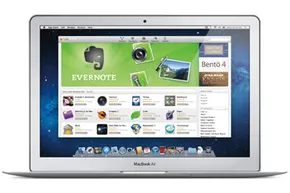
Suddenly, Mac users could research, buy, and download apps directly from their computers. No driving. No waiting for shipping. Just a few clicks.
By August 2011, the store had already expanded to 90 countries. It boasted 21 categories. Hundreds of apps. Everything from language flashcards to yoga routines. It was a massive shift in how we consumed software.
How to Access the Mac App Store
The store didn’t appear out of thin air. It was preinstalled on Macs running OS X Lion (version 10.7). You’d look for the icon. A blue circle. White outline. An “A” in the middle.
Did you have an older system? You weren’t locked out. The Mac App Store was compatible with OS X Snow Leopard (version 10.6).
Here is how you got it if you weren’t on Lion yet:
- Click the Apple icon in the top left of your screen.
- Choose “software update.”
- Wait for the dialog box.
- Click “install.”
When the installation finished, you restarted your Mac. Then you launched the store from your dock. It was simple. It was direct.
A Familiar Interface
The experience mirrored the iPhone and iPad App Store. Familiarity mattered here. Users knew the drill.
Click the icon. The store opened. You could search by name or keyword. You could browse by category. You could see “new and noteworthy” apps. Or check out staff favorites.
It wasn’t a completely new concept. It was modeled after iTunes and iBooks. Those apps had built-in purchase utilities. By June 2011, those platforms had already processed more than 15 billion songs and 130 million books. The Mac App Store was just the next logical step in that transactional evolution.
OS X Lion: The Real Game Changer
OS X Lion, released in July 2011, didn’t just bring the store. It improved it.
Apple added in-app purchases. They added push notifications. But the biggest technical win was the incremental update system.
Most updates used to redownload the entire application. Lion changed that. It identified only the files that needed updating. It downloaded them. It installed them. The process became faster. Significantly faster.
There was a catch, though.
The Mac App Store didn’t recognize updates for existing software apps on your computer. If you had a program installed from a disk, the store didn’t track it. To get automatic free updates for those apps, you had to repurchase them through the Mac App Store.
This was a subtle nudge. A small friction point designed to move you fully into the digital ecosystem.
The Environmental and Practical Shift
Think about the waste.
Before the store, downloading and updating required disks. Packaging materials. Shipping trucks. The environmental impact was tangible.
With the Mac App Store, it was all electronic. Less waste. Less clutter.
But there was another hidden benefit. Permits.
Apps sold on disk often had limited permissions. They were locked to a single computer. Want to install it on your laptop? Buy another copy. Want to install it on three work computers? Buy a pricey group license.
The Mac App Store changed the rules. It kept track of past purchases.
You could install apps on every Mac you owned. You could download them again as necessary. This was huge for people who bought new Macs. No more hunting for old installation CDs. Just log in. Download. Go.
When You Can’t Find the App
Ever tried to open a file? You click it. Nothing happens.
You don’t have the application required to open it.
On Macs with access to the Mac App Store, a dialog box would open. It offered to search the store for a program that could handle the file. If found, you could buy the app instantly.
No closing the file. No googling. No visiting a retailer’s website. Just buy and open.
The Cost of Software
The store offered free apps. And it offered paid ones.
On average, you could expect to pay between $15 and $80 for an app. That was the standard range.
But prices could skyrocket.
Take the iRa Pro mobile video surveillance app. It cost $899.99.
One app. Nearly nine hundred dollars.
It reminded you that software wasn’t just about convenience anymore. It was a market. A diverse, sometimes absurdly expensive market.
What is the actual value of a tool that monitors a space you aren’t in?
The process for buying any app, whether it cost $2 or $900, followed a specific path. We will cover the step-by-step guide next. But for now, you understand the landscape.
Windows Has Caught Up
Don’t have a Mac?
You aren’t excluded.
There are an increasing number of new app stores for Windows. They offer the same one-stop software shopping experience. Pokki. Avenue App Store.
The ecosystem is converging. The hassle of the “olden days” is fading. But the transition wasn’t seamless. It was messy. It was expensive. It was necessary.
Now you just have to decide what to install next.
Apple’s ecosystem is a walled garden. It’s closed. This makes moving Mac-native components to Windows PCs difficult, sometimes impossible. But that same closure means Apple’s hardware and software are built to sing together across product lines. The Mac App Store is the storefront for this harmony. It lets third-party developers create and sell apps to the entire Mac user base.
Developer Access and Economics
Developers can register for free with Apple. This gives them access to a developer kit. They can read guidelines. They can connect with peers. When an app is ready, it goes into the approval queue with an icon and keyword description.
There is a cost to entry. Third-party developers pay an annual $99 subscription fee. But consider what they get in return. They avoid spending money on marketing. They skip hosting costs. They tap into an audience-rich marketplace.
Pricing is developer-driven. You set your own prices. Apple handles the credit card processing, so you don’t pay those transaction fees. Apple keeps 30 percent of the retail price. The developer gets 70 percent.
Developers receive 70 percent of the retail price after Apple takes its cut and handles payment processing fees.
The User Purchase Flow
Buying software on a Mac is straightforward. Launch the Mac App Store. Select an app. Click the price icon. It will say “free” or show a cost. Then you click “buy app.” A dialog box asks for your Apple ID and password. Payment methods include a credit or debit card, an iTunes card, or a PayPal account.
The app downloads immediately. It installs directly into your computer’s Applications folder. No manual file hunting required.
Discovery and Reviews
If you want to know more before buying, scroll through the screenshots. There are multiple images. But trial versions don’t exist here. You can’t demo the software before purchase. So you rely on user reviews. Or you research elsewhere for objective opinions.
The Mac Store doesn’t vet its reviews. Opinions vary wildly in helpfulness. Some are useful. Most are noise.
How does the Mac App Store curate featured apps?
The store offers genre categories. It also has a “new and noteworthy” section. This feature shows 12 apps on the launch page. A separate tab holds 40 apps in total. Apple chooses these. There are no published guidelines for selection. Developers speculate it comes down to having an appealing icon and an attractive price point.
Future Hardware Implications
The Mac App Store is growing. More apps. More users. But Apple’s gaze is shifting. Attention is turning to other devices. A major iPhone hardware and software revamp is in the works. It was scheduled for a 2012 release.
That update included a new way to charge the phone. If Apple switched to cable-free charging, it could influence future Mac computers. Just as the iPhone’s App Store influenced the Mac App Store. Small changes in hardware can ripple up the stack.
Frequently Asked Questions
How do I get the Mac App Store?
It comes pre-installed on Macs running OS X Lion (version 10.7). If it’s missing, it’s a free download from the App Store app on your Mac.
What is the difference between App Store and Mac App Store?
The App Store is for iOS devices like the iPhone and iPad. The Mac App Store is strictly for Mac computers.