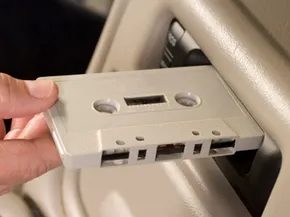
Paul Galvin figured out how to put music in cars way back in 1930. He parked a Studebader with a radio outside the Atlantic City pier for the Radio Manufacturers Association Convention. That moment changed everything. People started expecting tunes while they drove.
Crosley Radio followed up with the Roamio, the first car radio. Automakers quickly added them as factory accessories. Those early sets only caught AM signals. FM came later. The real shift happened in the 1960s. Celebrities like Frank Sinatra and James Garner drove cars with 8-track players.
Technology moved on. 8-tracks died. Cassettes took over. But cassettes didn’t last long either.
Good news for anyone still clutching those physical tapes. You don’t need to toss your collection. You also don’t need to buy a shiny new head unit. Most readers likely have a car with a cassette slot but no CD player. If you want to listen to CDs without swapping out the stereo, there are ways to do it.
Here are five methods to play CDs in a vehicle with a cassette player.
5. Use a Laptop Computer
This might seem obvious, but it works. You need a laptop with a CD drive. Connect your headphones to the laptop’s audio jack. Plug the other end into your car’s auxiliary input if you have one. If not, you might need a FM transmitter. Or just listen through the headphones. It keeps the dashboard clear. It also means you aren’t relying on a proprietary adapter that might break.
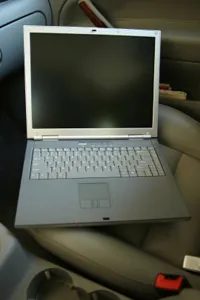
If your laptop still has a drive, don’t let it gather dust. You can turn it into a portable music hub on wheels. There are three ways to get sound out of those discs. Headphones are the obvious choice. You plug them into the jack. It’s personal. It’s clean. No one in the back seat has to suffer.
Portable speakers are an option, but they’re bulky. You’re hauling the laptop AND the speakers. That’s a logistical headache. You could leave the speakers in the car and just connect the laptop each time you need music. That works. It’s clunky. The third option is the laptop’s built-in speakers. This is usually a bad idea. The audio quality is thin. The volume is low. And if the windows are down? You hear nothing but wind noise.
Check your local laws before driving with headphones. In some places, wearing earbuds is illegal. Don’t risk a ticket for a song.
The Power Problem: DC vs. AC
So you have the player. Now you need power. Your car runs on direct current (DC). This comes from the battery. It powers the engine management, the lights, the sensors.
Most portable CD players want alternating current (AC). That’s the power from your wall outlet. It’s the same juice that runs your kitchen appliances. You could use batteries. C-cells. D-cells. Unless you want to spend a fortune on fresh batteries every week, AC is the better route. It’s consistent. It doesn’t die halfway through your commute.
Enter the DC-to-AC power inverter.
This little box takes your car’s DC power and flips it into AC. Now your portable player can plug into the cigarette lighter or a dedicated outlet and run like it’s in your living room.
There are three types of inverters. Square wave. Modified sine wave. Pure sine wave.
Pure sine wave is the gold standard. It produces clean power with minimal harmonic distortion. Your electronics will love it. But it costs more. Square wave inverters are cheap. You can find them at most electronics stores. They work. They power the CD player just fine.
But here’s the catch. If you have a good ear, you might hear interference. A hum. A buzz. The square wave isn’t as smooth as the pure sine wave. It’s a trade-off. Cheap hardware. Slightly noisy output.
The Portable Player Advantage
If you aren’t using a laptop, grab your personal portable CD player. It’s 1995 again. You’re securing the device. Maybe it’s on the passenger seat. Maybe it’s tucked in the center console. Secure it so it doesn’t slide when you brake.
Plug in your earbuds. Check the law again. If it’s legal, you’re good. You’re mobile. You’re streamlined. You don’t need a boom box. Boom boxes are heavy. They eat batteries like crazy. A personal player fits in the glove box. It slips under the seat. It’s small. It’s efficient.
This tech seemed impossible just a few years before. In 1982, Sony launched the CDP-101. The first home CD player. Philips followed in 1983. Then Sony realized people wanted to move. They built the Discman D-50. The technology was cutting-edge. It catapulted them to the top of the electronics industry.
We’re still using that logic. We just swapped the Discman for a laptop. Or an inverter. The medium changes. The desire for music doesn’t.
AC/DC took their name from a label on an appliance. A nod to the very power source we’re fighting to harness. Angus Young’s riffs. Bon Scott’s scream. Brian Johnson’s howl. The music has been heavy since 1973. The delivery systems are lighter.
But the connection? That’s still heavy.
Cassettes dragged their feet into retirement. It wasn’t that the technology was obsolete overnight. It was that people had invested heavily in physical media. You bought tapes. You listened to them. You didn’t just trade them in for shiny discs without a fight.
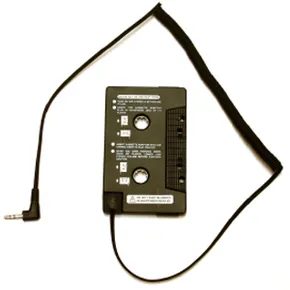
When the Sony Discman D-50 dropped, the market reacted fast. But not by replacing the car stereo. Instead, manufacturers sold you a bridge. A plastic imitation of a cassette tape with a wire and a plug. You popped it into your deck. You connected your portable CD player. Suddenly, your car speakers reproduced the audio.
This works today. You can still buy these adapters online. They are cheap. They are reliable. Some even include mounting brackets so your Discman doesn’t slide across the dashboard. You plug the adapter into the headphone jack. You turn it up. The music plays.
Most kits include an AC adapter too. If your portable player has a DC input, you can plug it into the cigarette lighter. No more hunting for AA batteries. Just power and audio.
But what if your car doesn’t have a cassette deck? Or if you want to play a format that doesn’t fit into a plastic shell?
1: Install an FM Modulator
This is where things get interesting. And slightly messy.
FM modulators are devices that broadcast audio from a portable player over the airwaves. You tune your car radio to a specific frequency. The modulator transmits on that same frequency. Your car picks it up. You hear the music.
It’s not a physical connection. It’s wireless. In theory.
Here’s the catch. FM bands are crowded. You might have to search for a clear channel. You might find static. You might hear a local news station bleeding into your playlist. But it works.
How FM Modulators Work
The device sits in your glove box or on the dashboard. It has a headphone jack input. You plug your portable CD player, MP3 player, or even your phone into it. Then you dial in a frequency. 88.1? 107.9? You pick one that isn’t dominated by a powerful local broadcaster.
Your car’s radio tunes to that frequency. The modulator sends the audio signal as an FM radio broadcast. The car’s antenna receives it. The speakers play it.
It’s simple. It’s cheap. It’s also prone to interference.
Why You Might Choose an FM Modulator
You don’t have a cassette deck. You have a blank slot. Or maybe you have a cassette deck, but you don’t want to use an adapter. Maybe you’re using a digital device that doesn’t have a headphone jack that’s easily accessible. Or maybe you just want to avoid wires cluttering your console.
FM modulators are a universal solution. They don’t care about the format. They only care about audio output. If your device has a headphone jack, it works.
The Downsides of FM Transmission
Static. Always static.
Even on a clear channel, you might hear a faint hiss. Distance matters. The closer the modulator is to the antenna, the better. But if you’re driving through a city, other stations might interfere. You might have to change the frequency as you move.
It
The FM Modulator Fix for CD Players
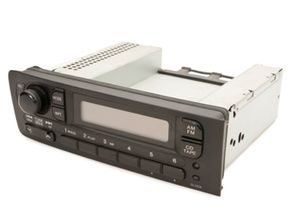
If your car stereo is stuck in the past, an FM modulator might be the most practical way to hear your CDs. It works by broadcasting your audio over an empty FM frequency. You tune your car radio to that specific channel. The signal comes from a small module plugged into your device’s headphone jack.
This setup makes it feel like the CD player is hardwired into your dashboard. But there is a catch. These devices struggle in major cities. Too many FM stations crowd the spectrum. You are better off using one in rural areas or smaller towns where the airwaves are quieter.
Signal Interference Issues
Static is the enemy here. If a local radio station appears on the frequency you chose, the quality drops. The music fades. The radio station takes over. It is a constant battle for clear sound.
Despite the noise, the ease of use is hard to beat. No wiring. No installation headaches. Just plug it in and drive.
Finding the Right Hardware
If you hunt around online, you will find models with AC adapters. These power sources are similar to those found in cassette adapter kits. They keep the modulator running without draining your car battery.
So there you have it. Five solid ways to play CDs in a car that only has a cassette deck. The technology is simple. The results vary.
Related Articles
- What’s the best way to play my iPod in the car?
- How do I get the best sound out of my car stereo’s audio system?
- 5 iPod Car Accessories
- How Bluetooth Car Stereos Work
- How to Install New Entertainment Electronics in Your Car
Sources
- Maison Connoisseur. “Crosley Radio – A History.” (Jan. 17, 2009)
- Morton, David. “The History of the 8-Track Tape.” The History of Sound Recording Technology. 1998. (Jan. 18, 2009)
- Motorola. “Music in Motion: The First Motorola Brand Car Radio.” (Jan. 16, 2009)
- Rozenblat, Lazar. “DC-AC Power Inverters.” Lazar’s Power Electronics Guide. (Jan. 17, 2009)
- Sony Global. “Sony History.” (Jan. 16, 2009)