A woman in South Florida didn’t just eat her lunch in 2004. She auctioned it. The item? A partially consumed grilled cheese sandwich. The buyer? Someone who believed one of the bread slices bore the face of the Virgin Mary. The price tag? $28,000.
That’s not a myth. That’s eBay.
By March 2005, the platform had grown into something unrecognizable from its early days. It wasn’t just a place to sell old records anymore. It was the world’s largest garage sale. Online marketplace. Digital car dealer. It boasted 147 million registered users across 30 countries.
You could list anything. Encyclopedias. Snow boots. Stereos. Airplanes.
If you looked hard enough—and if the moderators missed it—you might even find a human kidney for sale. Or a virtual date.
But beneath the weirdness lies a system. A complex web of bidding, trust, and technology that powers the largest auction site in the world.
How eBay Works: The Mechanics of the Marketplace
Buying and selling on this platform isn’t just about clicking “buy now.” It’s a ritual. It’s a gamble.
When you list an item, you’re setting the stage. You set a starting bid. You set a duration. You set a reserve price if you’re feeling cautious.
When a bidder enters the fray, they’re not just placing a number. They’re entering a loop. The system updates in real-time. The clock ticks down. The tension rises.
For sellers, it’s about presentation. Photos matter. Descriptions matter. Trust matters more than anything else. One bad rating can sink a store.
For buyers, it’s about vigilance. Fraud is real. Scams exist. You need to know how to spot a fake tracking number. You need to understand how payment protection works.
The Business Behind the Bids
Why did the grilled cheese sell for $28,000?
Because people pay for novelty. Because people pay for stories. Because the platform allows for it.
The technology behind the scenes is simple in concept but complex in execution. It handles millions of transactions daily. It tracks bids. It calculates taxes. It manages shipping labels.
But it also manages human behavior.
People lie on these sites. People misrepresent items. People try to exploit the system.
That’s why the rules exist. That’s why the feedback system exists. It’s a social contract enforced by code.
Protecting Yourself in the Digital Auction House
You want to buy that vintage camera? Or that rare first-edition book?
First, check the seller’s history. Are they new? Have they sold hundreds of items with five-star ratings? Or are they a one-hit wonder with a vague location listed?
Second, read the description. Every word. Look for disclaimers. Look for condition reports.
Third, use secure payment methods. Never send money outside the platform’s system. If a seller asks for a wire transfer, run.
It’s that simple. Or it should be.
The Technology That Powers the Auction
How does the site handle the load?
It uses a distributed architecture. Servers talk
Navigating eBay’s Marketplace Structure
eBay remains one of the most recognizable faces of online commerce, though its core function as an auction house defines how users interact with it. You start by browsing categories that span almost every physical good imaginable. The list includes Antiques, Boats, Clothing & Accessories, Computers & Networking, Jewelry & Watches, and Video Games.
Once you spot something interesting, you click through to the details page. Here, you evaluate the item based on pictures, descriptions, and logistical data like payment options and shipping costs.
Searching for Specific Items
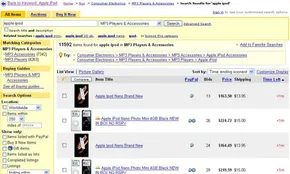
If you know exactly what you want, you can use simple keywords. “Apple iPod” might bring up results, but that could be a mess. To refine how to search eBay effectively, you need advanced criteria. You can exclude keywords, filter by item location, set a price range, and select accepted payment methods.
This precision matters. It saves time in a marketplace with millions of listings.
Understanding Bidding Contracts
Placing a bid is serious. You enter a contractual agreement. If you win, you must buy the item.
Most auctions have a minimum starting bid. Some include a reserve price. This is a secret minimum amount the seller accepts. If bidding does not reach this threshold, the seller keeps the item. The contract remains void.
This structure protects sellers from losing valuable items for pennies. It also adds tension to the bidding process. Will someone push the price higher?
Fixed-Price and Buy-It-Now Options
eBay isn’t just about auctions. Fixed-price listings dominate the site now. Shopping here feels like any other online store. You see an item. You buy it. You pay. You wait for delivery.
There is also a hybrid option. Some auction listings offer a “Buy it Now” price. This cost is typically higher than the starting bid.
Choosing this option ends the auction instantly. The item is yours. No waiting. No competition.
“If you choose to buy the item for the ‘Buy it Now’ price instead of bidding on it, the auction ends instantly and the item is yours.”
This feature appeals to impatient shoppers. It also appeals to those who fear losing an item to a last-second snipe.
Why This Matters for Everyday Users
For the average consumer, eBay offers flexibility. You can gamble on an auction. Or you can guarantee ownership with a fixed price.
The platform supports both strategies. It adapts to different shopping behaviors.
But the rules are clear. Bids are binding. Reserve prices are secret. Buy-It-Now is final.
Understanding these mechanics helps you avoid surprises. You know what you’re signing up for.
Does this structure still feel fair? Or has the shift toward fixed prices eroded the auction’s soul?
The platform continues to evolve. The core mechanics remain.
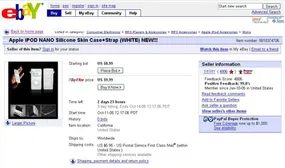
Payment options on eBay are surprisingly diverse. You can use money orders, cashier’s checks, or even cash and personal checks. Electronic services like PayPal and BidPay are also standard. But here’s the catch: the seller sets the rules. They decide what they will and won’t accept.
PayPal usually wins out. It’s the easiest option. eBay owns PayPal, so the payment process is baked directly into every auction listing. No switching tabs. No external logins. Just click and pay.
Selling is equally flexible. You can list almost anything. Your basement junk? Gone. That laptop you upgraded? Sold. The kids’ outgrown clothes? Listed. Even that couch that didn’t fit in your den. Some folks turn this into a business, opening their own “eBay store.” It’s not free, though. You pay listing fees. You also hand over a percentage of the final sale price to eBay.
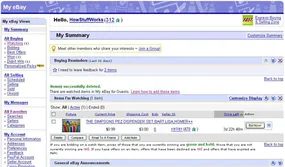
Once you register for free, everything lands in one place: My eBay. It tracks all your buying and selling activities in a single dashboard.
EBay is massive. We’re talking about 4.8 million new listings every single day. That’s not a typo. Before we dive into the how-to, we need to look at the engine room. How does a site handle that volume without crashing?
The Backbone of the Beast
The infrastructure behind eBay isn’t just one giant server. It’s a distributed system. Thousands of machines working in concert. When you list an item, it doesn’t just sit in a file. It’s indexed, categorized, and searched across a global network.
This scale requires redundancy. If one data center goes down, others pick up the slack. The code is written to be stateless where possible. This means any server can handle any request. No single point of failure.
For the buyer, this means speed. Search results load instantly. For the seller, it means visibility. Your item appears in searches within seconds of posting. The complexity is hidden. You see a simple form. The backend sees a massive data pipeline.
Why This Matters to You
You might not care about the server racks. But you should care about the reliability. When you bid on an item, you trust the system to record that bid correctly. When you pay via PayPal, you trust the transaction to clear. The infrastructure ensures that trust.
Consider the search algorithm. It’s not just matching keywords. It’s ranking items based on relevance, seller performance, and price. This is why finding that specific vintage camera or rare book is often possible. The system is designed to surface the right item.
But what about security? With millions of transactions, fraud is a constant threat. eBay uses automated systems to flag suspicious activity. Unusual bidding patterns. Fake accounts. These are detected in real-time. You don’t see the bot work. You just see a clean marketplace.
The Human Element in a Digital Space
Despite the tech, eBay is still human-centric. Sellers photograph items. Buyers leave reviews. The platform facilitates interaction. It doesn’t replace it. The infrastructure supports this human exchange. It handles the logistics so people can focus on the goods.
This balance is fragile. A glitch in the search indexing can hurt sales. A payment delay can kill a deal. That’s why the engineering team focuses so heavily on uptime
The 1999 service disruptions weren’t just a technical hiccup. They were a business-threatening event that forced eBay to completely rethink its technological backbone. For three days, overloaded servers went down. Users couldn’t check auctions. Bids couldn’t be placed. Transactions stalled. Everyone involved—buyers, sellers, and the company itself—was left furious. The aftermath wasn’t just a patch job. It was a total architectural overhaul.
In 1999, eBay ran on a single massive database server with a few separate systems handling search. By 2005, the landscape looked entirely different. The platform relied on 200 database servers and 20 search servers. This shift wasn’t arbitrary. It was a move toward grid computing, a design that prioritizes error correction and infinite scalability.
The Mechanics of Redundancy
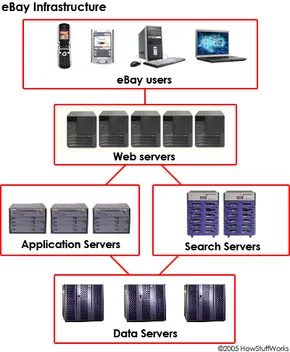
Everything on eBay except the search function runs on roughly 50 servers. These aren’t monolithic machines. They handle web requests, application logic, and data storage. Each server holds between six and 12 microprocessors. They operate independently but communicate constantly. If one node fails, the others know immediately.
The system is designed to absorb shock. While the core logic needs about 50 servers, eBay operates with four times that amount. The 200 servers are grouped in sets of 50 across four different physical locations within the United States.
When you load a page, your request might hit any of those four sites. They all hold identical data. If one location crashes, the other three instantly pick up the slack. There is no single point of failure. The architecture ensures continuity because redundancy is baked into the foundation.
How eBay Handles Your Click
Let’s trace the path of a single click. You are browsing for a Persian rug. Your computer contacts a Web server. That server talks to an application server. The application server pulls the necessary data from storage servers. You see the current bid price. You see the time remaining. It all happens in milliseconds.
To keep this fast, eBay uses local partners in many countries. These partners cache static data locally. This cuts down on download times significantly for users far from the US data centers. But speed isn’t just about caching. It’s about vigilance.
Monitoring systems are deployed in 45 cities around the world. These tools constantly scan the network for anomalies. They look for latency spikes, failed connections, or server overload. The system doesn’t wait for a user to complain. It detects issues before they become widespread outages.
Under the Hood: Java and Scalability
Most of the code powering eBay is written in Java. Java’s platform independence and robustness made it the logical choice for a system that needs to run on hundreds of disparate servers. The language handles memory management and threading in a way that supports the heavy concurrent load of millions of simultaneous users.
This infrastructure allows millions of people to search, buy, and sell at the same time. To the user, it feels seamless. The complexity is hidden. You just see the rug. You see the price. You click.
Speaking the Language
Most of the code that makes up eBay is Java. See How Java Works to learn about this programming language.
Using eBay: Browsing for Items
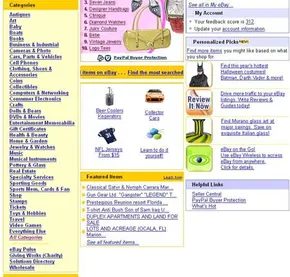
There’s no substitute for just jumping into the deep end. You want to know how to use eBay? Start buying. Or finding. Or both.
Let’s say you are hunting for something specific. Maybe a surround-sound system for your living room. Or perhaps a genuine mink stole for a costume party. Maybe, like us here at HowStuffWorks, you have a sudden, burning desire for a Homer Simpson Pez dispenser.
Whatever the case, you have two distinct paths to find it: browsing or searching.
Browsing is the slow route. It’s indirect. It forces you to learn how the site is structured rather than just typing a query into a box. It’s worth doing once, just to understand the landscape.
The homepage offers a clear map. Look to the left sidebar. Those are the top-level categories. They are the main arteries of the site.
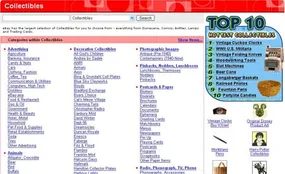
Since we are looking for a novelty item, we need to know where collectibles live. Pez dispensers aren’t just candy wrappers. They are vintage assets. They fall under Collectibles.
Click that link.
You won’t land on a list of Homer Simpsons yet. You’ll hit a gateway. A page filled with subcategories.
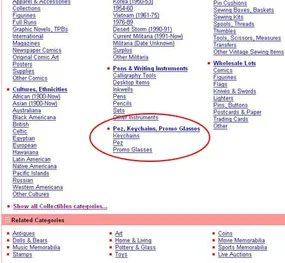
Scroll to the very bottom. It’s easy to miss because the layout buries it in the footer’s sub-sub-categories. Look for Pez, Keychains, Promo Glasses. Dig one level deeper into the Pez folder inside that group. You will find another Pez subcategory nested within it.
The site structure creates a redundant folder loop for promotional merchandise.
Why does this matter? If you are scraping this site or building a navigation crawler, you need to handle recursive loops. The directory path repeats the same term. A simple depth-first search might hang if it doesn’t track visited nodes.
For users, it just means finding a specific piece of plastic candy dispenser merch is harder than it needs to be. The UI doesn’t guide you there. You have to dig.
Most big retailers flatten their taxonomy here. They put all promo items in one bucket. This site splits them by material or novelty. That creates this messy hierarchy.
You can ignore it. Unless you are auditing the sitemap, you won’t see it. But if you are trying to index every single product page, this loop is a trap.
It clicks. You are ready to drill down.
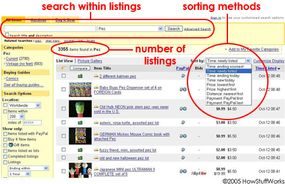
Clicking on “Pez” drops you into an auction-level page. It’s not just a list. It’s a battlefield of listings.
Here is the layout:
- 3,355 listings currently in the Pez category.
- Sorted by time. Newest auctions hit the top first.
- A search bar ready for action.
You want the Homer Simpson Pez dispenser. Not just any Pez. The yellow one with the blue hair.
Type “Homer Simpson” into the search box right above the listings.
Watch what happens.
It does not scan the whole of eBay. It stays locked in the Pez subcategory. This is key. You are narrowing results, not widening them.
If you need to search all of eBay, you have to toggle the dropdown menu in the category field. But for now, keep it tight.
Hit enter.
The results shift. The noise disappears. Only the Simpsons-themed dispensers remain.
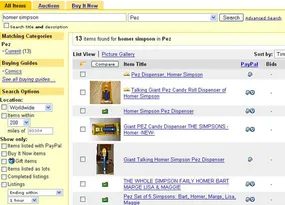
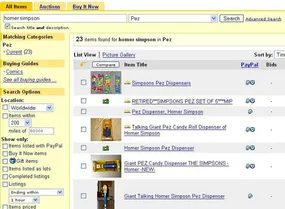
Thirteen items is a decent start. But if you’re hunting for something specific, it’s likely not enough. The fix is simple. Go back to the search bar. Check the box that says “Search title and description.”
The first time we looked for “Homer Simpson,” we only scanned auction titles. That’s a smart move if you know exactly what you want and how sellers label it. Need a GPS receiver? Yeah, the seller will put “GPS” in the title. It’s safe to assume.
But collectibles are trickier. A seller listing a Homer Simpson Pez dispenser might not bother typing out “Homer Simpson.” They might just write “Simpsons.” Or maybe just “Homer.” If you only search titles, you miss that listing entirely.
So we switched tactics. We searched the entire auction descriptions. Usually, that yields more hits.
This time, we landed on 23 listings.
There is a faster way to get to this exact point, though. If you’re just browsing for a bargain on random collectibles, clicking through categories is fine. It’s leisurely. But if you need a specific item, the search function is your fastest route.
Using eBay: Searching for Items
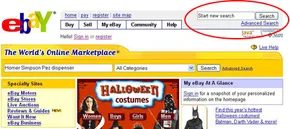
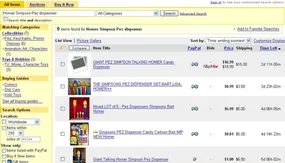
Search mechanics and category sorting
The eBay homepage starts with a search box. You type what you want. The engine returns results. Simple, right? But the results page does more than just list items. It sorts them into categories.
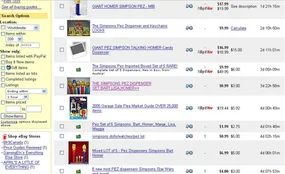
Notice the Homer Simpson Pez dispensers. They don’t just show up in the Pez category. They appear elsewhere. The search scans both titles and descriptions. That expands the hit count. You get 25 results. More than browsing alone would yield.
Finding deals through expanded search
One listing sits halfway down the page. It’s a full set. Simpsons dispensers. Homer included. The starting price is 99 cents.
This happens because the search logic doesn’t restrict itself to one category. It looks everywhere. You might miss that set if you only clicked through the Pez menu. The search box finds it anyway.
The Hidden Costs in Low-Ball Listings
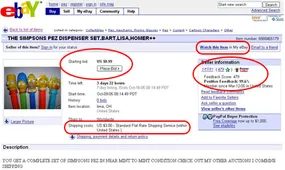
The numbers look tempting. Starting price is low. Shipping is reasonable. Seller feedback sits at a healthy 99.6%. It feels like a win before you even bid.
Don’t get comfortable.
That low starting price? It’s bait. Savvy sellers often use this trick. They list an item for pennies to catch your eye. Then they inflate the shipping cost to make up the difference. You end up paying more than the item is worth. Always check the shipping price first. If it looks weird, walk away.
Feedback scores matter for more than just ego. They are your trust signal. A 99.6% rating means the seller has mostly kept their word. It doesn’t guarantee perfection. But it’s a green light. Your feedback score works the same way. It tells future sellers they can trust you with their cash.
Why Check Seller Feedback Before Bidding
You’re not just buying a product. You’re entering a handshake deal with a stranger. The feedback score is that stranger’s reputation. High scores usually mean reliable shipping and accurate descriptions. Low scores? That’s a warning label.
We’ll dig deeper into how to read those scores. For now, just know that 99.6% is solid. It means the seller has earned trust. Ignore that, and you’re gambling.
How to Track Your eBay Auctions
Once you’ve verified the shipping and the seller’s reputation, you’re ready to commit. Or are you?
Click Watch this item in My eBay. It’s in the top right corner. Don’t skip this step.
Why watch an item you aren’t bidding on yet? Because auctions move fast. Prices jump. Time runs out. If you don’t bookmark the item, you’ll lose it in the noise of the site. The watch list keeps it front and center. You get notifications. You can monitor the current bid. You can decide if you want to jump in later.
Now it’s sitting in your watch list. You’re tracking it. You’re protected from shipping scams. You’ve verified the seller. You’re ready to bid when the time is right.
Next up: understanding feedback in detail. But for now, keep your eye on the prize.
The Hidden Noise in Search Results
Searching titles and descriptions opens the floodgates. You get more options. But not all of them are useful.
This is a direct result of how sellers market items.
Consider a listing for a Batman Pez dispenser. The description might include a note: “I’ll also be listing several Homer Simpson t-shirts some time next week, so check back if you’re interested.”
That sentence triggers the search algorithm. Now your results for the Pez dispenser include a listing for Homer Simpson shirts. It is irrelevant to your current search. It clutters the feed.
Some sellers take this further. They use a tactic known as keyword spamming.
They stuff their auction description with a long list of popular search terms. The goal is to ensure the listing appears in search results for any of those terms. This increases visibility. It does not increase relevance.
You end up wading through noise to find what you actually want.
“Some sellers also use a trick called ‘keyword spamming’ to get more people to look at their auctions.”
This is the reality of using eBay for buying items. The search function is powerful. It is also imprecise. You must learn to filter out the marketing noise.
The next step is to refine your search strategy. But first, you need to understand why the results look this way.
It is not a bug. It is a feature of the platform’s design. Sellers are optimizing for clicks. You are optimizing for accuracy.
These goals often conflict.
You will see this pattern repeatedly. A search for one item yields results for another. It happens because the text fields are treated equally by the search engine. A mention is a match.
This creates a frustrating user experience. You click on a result. You land on a page that has nothing to do with your query.
This is the cost of broad matching.
The algorithm cannot always distinguish between a primary product and a secondary note. It sees text. It returns matches.
You have to do the heavy lifting. You have to read the descriptions. You have to spot the spam.
It is tedious. But it is necessary.
The platform rewards those who can navigate this noise. It punishes those who assume the search results are curated.
They are not.
The next section will cover how to use filters to cut through this clutter. But for now, recognize that every result you see has a reason for being there.
Sometimes the reason is solid.
Sometimes it is just a desperate attempt to get your attention.
How do you tell the difference?
You look closer. You check the seller’s other items. You read the fine print.
It is not efficient.
It is the only way to shop effectively on eBay.
The alternative is wasting time.
You have better things to do than sift through keyword spam.
But you still have to do it.
Until the filters get smarter.
Or until the sellers stop trying to game the system.
Until then, you are on your own.
Guest Browsing vs. Active Participation
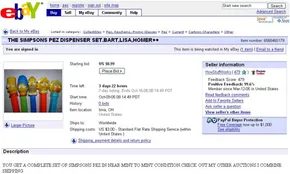
You don’t need an account to browse eBay. Search works fine. Watch up to ten items as a guest. But that’s where the limits start. No bidding. No buying. You’re just looking.
To actually participate, you need to register. It’s free. It’s quick.
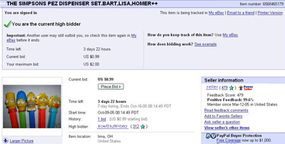
Once you’re in, you can bid on a set of Simpsons Pez dispensers. Click the link in your watch list. You land back on the auction page.
Every auction page has four distinct sections.
Title and Overview
This is the headline. You see the auction title, current price, shipping costs, seller info, and bid count.
Description
The seller writes the details here. What’s in the box. What’s the condition.
Shipping, Payment, and Return Policy
Check this before you bid. How much does shipping cost? What payment methods are accepted? Can you return it if you don’t like it?
Bidding
This is where you enter your price.
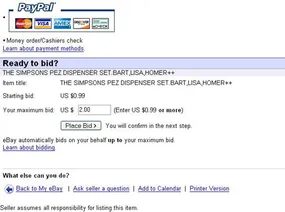
eBay uses proxy bidding. You don’t enter your actual bid amount step-by-step. You enter your maximum. eBay bids incrementally on your behalf. It goes up just enough to stay ahead. Until it hits your max.
You want the Pez dispensers. You think they’re worth $2.00. Type $2.00 into the bid box. That’s it.
The Math Behind the Maximum Bid
The screen goes blue. You see your number. It’s private. Only you see the max you’re willing to pay.
But look at the current price. It says $0.99. You entered $2.00. Why the gap?
Because you are the first bidder. Your max sets the floor. The system doesn’t jump to your limit. It starts at the minimum increment.
This is proxy bidding in action. eBay bids for you. It goes up in small steps. $0.05 for cheap items. Larger jumps for expensive ones.
If someone bids $1.25, eBay counters with $1.31 on your behalf. You still win.
If they bid $2.01, you lose. eBay sends an email. You can bid again. Or walk away.
The Psychology of the Bidding War
This is where logic breaks down.
If everyone bid their true maximum, the auction would end instantly. The highest bidder wins. Quietly. Efficiently.
But humans don’t do efficient. We do reactive.
We look at the current price and think, “I’ll beat that by a dollar.”
So you bid $3.00. You win again.
Then the other person raises it. You raise it. Again.
This is a bidding war. It’s expensive. It’s adrenaline. It’s not about the Pez dispensers anymore. It’s about not losing.
The war usually drags on until the final seconds.
People wait. They watch. They refresh.
The last ten seconds are a bandwidth battle. Dial-up users are dead in the water. Cable modem users type fast. You can submit a winning bid in two seconds. They can’t.
Speed matters. Connection speed matters.
The Buy It Now Loophole
Why bid early?
Usually, you don’t. You wait.
But there is an exception.
Some items have a Buy It Now option. You can pay a high fixed price and end the auction immediately.
If you want the item but hate the price, you can’t stop the Buy It Now bidder.
Unless you bid first.
One bid kills the Buy It Now button.
It disappears. The auction continues as normal.
Scammers use this. They bid the minimum amount to remove the easy-out option. They hope no one else notices. You’re now stuck in a bidding war. Or you wait for them to overpay.
Trust Through Feedback
Who are you buying from?
How do you know they’ll ship?
How do you know they aren’t selling fakes?
The answer is feedback.
Every transaction leaves a mark. Buyers rate sellers. Sellers rate buyers.
The score is public. It sits next to the username.
Positive. Neutral. Negative.
If you don’t get the item, you leave negative feedback. If the seller ghosted you, that’s one strike.
If you sell and the bidder doesn’t pay, you leave negative feedback.
A 99.9% positive score means trust. It means the user has completed thousands of transactions without major issues.
It doesn’t guarantee perfection. It guarantees a track record.
Check the feedback before you bid. Read the comments. Look for patterns.
One bad review out of a thousand might be a fluke. Ten bad reviews? That’s a pattern.
The system isn’t perfect. It’s a crowd-sourced reputation engine. It relies on honesty. It relies on the desire to be seen as reliable.
When you see that high score, you breathe easier.
When you see a new account with no history, you hesitate.
That hesitation is your only protection.
We won the Simpsons Pez dispensers. Now we have to actually pay for them. The seller’s listing accepts PayPal or a physical check—money order or cashier’s. It’s a narrow slice of what’s possible. On eBay, buyers generally face four payment options: cash, personal checks, paper money orders or cashier’s checks, and electronic transfers.
Cash is the easiest method. It’s also the dumbest. You’re mailing physical currency to a stranger. If it gets lost in the mail, you have zero recourse. Sending it via registered mail adds cost without adding much safety. Personal checks are marginally safer. The catch? You wait. Sellers rarely ship until the check clears. That’s an extra couple of weeks of waiting on your end.
Paper money orders and cashier’s checks sit in the middle. They don’t need to clear like a personal check. The wait time is shorter. But you still have to go to a bank or store. You still have to mail it.
Electronic payment is the fastest option. It’s practically instantaneous. You use services like PayPal, BidPay, or WesternUnion.com. You draw funds from a bank account or credit card. Or you buy an electronic money order online. The data travels over the internet. The downside? Risk. Any online transfer of financial data carries inherent danger.
Once payment clears, the seller ships the item. The auction listing says “Standard Flat Rate Shipping Service.” That phrase tells us nothing. It’s vague. To get details, you use the “Ask seller a question” link in the Seller Information box at the top of the listing. You have to ask.
When the box arrives, you leave feedback. If the seller did their job—shipped on time, item matches description—you leave positive feedback. If you’re unhappy, contact the seller first. Try to resolve the issue. Most problems are solved with a simple email exchange. Don’t leave negative feedback immediately. You can’t retract it once it’s submitted.
eBay Etiquette: Buyer Do’s and Don’ts
Do:
-
leave feedback for every transaction
-
pay within the seller’s preferred timeframe
-
read the entire listing before asking questions
Don’t:
-
leave negative feedback before contacting the seller
-
leave rude feedback
We’ve searched. We’ve bid. We’ve paid. Next, we sell.
More Resources
-
Buyer Resources
-
Searching Overview
-
eBay Glossary
-
All About My eBay
Outcome: We Got Cocky
Three days passed. We were still the only bidder on the Pez dispensers. The author let her guard down. She left eBay. She started working on her next article. But competition was waiting. In the final minute, three bidders appeared. The Simpsons set sold for $7.50. The author didn’t win.
What Can You Sell on eBay?
You can sell almost anything. Almost. Not everything flies. Illegal items are out. Illicit drugs, government-controlled products like liquor, tobacco, guns, and prescription drugs are banned. Lock-picking tools are prohibited. Surveillance equipment like wiretaps or hidden cameras is off the table. Human body parts or remains are forbidden. Your extra kidney? Gone. Your dead uncle’s foot? Not happening. You also can’t sell something that doesn’t exist in a concrete form. You can’t sell your soul.
David Finn tried. He got shot down. His auction was pulled. Here is what an eBay representative wrote to him regarding the decision:
If the soul does not exist, eBay could not allow the auctioning of the soul because there would be nothing to sell. However if the soul does exist, then in accordance with eBay’s policy on human parts and remains we would not allow the auctioning of human souls. The soul would be considered human remains, although it is not specifically stated on the policy page…
For the full list of prohibitions, check “What items may not be sold on eBay?”. If your item isn’t there, you’re probably safe. The author has a refurbished Samsung Yepp MP3 player. She bought it years ago. She never uses it. It’s legal to sell. We’ll list it next.
Spelling Matters
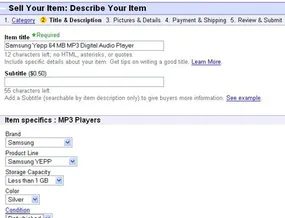
Watch your spelling in titles and descriptions. If you misspell “MP3” as “MP#” by holding the shift key too long, you’ll only attract searchers looking for typos. These bidders want deals. They want items with no competition. They get them for super-cheap prices. Websites and programs exist solely to find misspelled auctions. Use the spell-check button on the “Describe Your Item” page. Don’t leave money on the table.
The First Step: Choosing the Right Listing Type
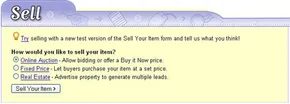
You don’t need a degree in e-commerce to move a refurbished Samsung Yepp MP3 player. You just need the right details and, ideally, a photo that doesn’t look like it was taken in a dark closet. Click Sell at the top of the homepage. That’s it. The machine starts.
Since we’re not running a full-blown eBay Store and this isn’t real estate, we skip the fixed-price listing. We’re going with Online Auction. This is the traditional route. It creates urgency. It lets the market decide the price.
Next, you have to pick a home for your item. Where does a Yepp belong? Consumer electronics. Obviously. But don’t just click the first big box you see. eBay’s category tree is deep. You need to drill down.
Finding the Niche Category
Most people stop at “Consumer Electronics.” That’s a mistake. It’s too broad. Your MP3 player gets lost in a sea of iPhones and Kindles.
Go to:
– Consumer Electronics
– Portable Audio & Video
– MP3 Players
This specificity matters. It tells eBay’s algorithm exactly what you’re selling. It also tells buyers they’re in the right place.
Why Category Matters More Than You Think
You might think category is just bureaucracy. It’s not. It’s discovery.
When a buyer searches for “Samsung Yepp refurbished,” they’re not browsing Consumer Electronics. They’re hunting. If your listing is buried in the parent category, they won’t see it. If it’s in the specific subcategory, it has a fighting chance.
eBay’s search prioritizes relevance. Correct categorization boosts your visibility. It’s not magic. It’s basic indexing.
“Specific categories lead to specific buyers. General categories lead to general curiosity.”
So, click through. Find “MP3 Players.” Add it there. Then, you’ll face the next hurdle: the title. But that’s a battle for another time. For now, just know that getting the category right is the only way to ensure your Yepp isn’t ignored.
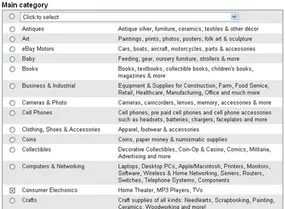
Skipping the paid second category was the right call. Consumer Electronics is where buyers actually hunt for MP3 players. Adding another category just for show wastes money and dilutes visibility.
Nailing the Specifics
The next page forces you to drill down. Precision matters here.
- Subcategory: MP3 Players
- Brand: Samsung
- Model: Yepp
This isn’t just administrative clutter. It’s how search algorithms sort your listing. If you miss the model name, your item disappears into the noise of generic Samsung electronics. Buyers know exactly what they want. They type “Samsung Yepp” into the search bar. If your listing doesn’t match that string, you lose.
The Description: Selling the Experience
Now you have to write the description. This is where most sellers botch it.
They don’t just copy the spec sheet. They tell a story. A boring story, usually. “It plays music. It has a screen.” Yawn.
Instead, you have to answer the implicit question: Why this specific Yepp model?
Is it the battery life? The tactile buttons? The nostalgia factor for early 2000s tech? Maybe it’s the lack of ads or DRM restrictions that modern players impose. Whatever the angle, you need to highlight it.
“Describe the condition honestly. Scratches on the screen? Mention it. Missing the original charger? Say so.”
Don’t hide flaws. Tech buyers are cynical. They assume you’re hiding something. Transparency builds trust faster than polished marketing copy ever could.
Why Details Matter More Than Keywords
You might think stuffing keywords in the description helps. It doesn’t. Platforms like eBay and Amazon have separate fields for brand and model. The description is for humans, not bots.
Write for the human who is holding a credit card.
- Clarity over cleverness.
- Specifics over generalities.
- Honesty over hype.
If the Yepp has a known quirk—the screen dimming in cold weather, the battery swelling after five years—put it in writing. It saves you a return and a bad review.
The description is your last chance to convince the buyer before they click “Buy Now.” Make it count.
Navigating the Auction Description Field
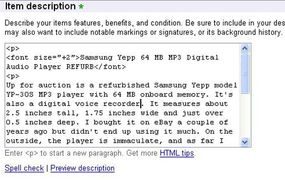
You won’t find a rich-text editor here. The input box for your item description sits at the very bottom of the page. It is a raw field. If you are comfortable with HTML, you can manipulate the layout. If not, you can treat it like a plain text block. Most buyers won’t notice the difference unless the formatting is broken.
For simple listings, skip the code. Just type your description. It will render as a single block of text. That is usually fine. But if you want structure, you can inject basic HTML tags. You do not need a complex stylesheet. Just a header and some paragraph breaks.
Using Basic HTML for Listing Structure
Think of it like this:
AUCTION TITLE
ITEM DESCRIPTION
ADDITIONAL DETAILS
You paste that structure into the description box. The platform interprets the tags. It creates visual hierarchy. This helps the buyer scan the details quickly. Here is how that looks in practice for a specific lot.
Real-World Example: Samsung Yepp MP3 Player
Consider a listing for a Samsung Yepp 64 MB MP3 Digital Audio Player REFURB. The seller uses the HTML template to separate the title from the condition report.
“Up for auction is a refurbished Samsung Yepp model YP-30S MP3 player with 64 MB onboard memory. It’s also a digital voice recorder. It measures about 2.5 inches tall, 1.75 inches wide and just over 0.5 inches deep. I bought it on eBay a couple of years ago but didn’t end up using it much. On the outside, the player is immaculate, and as far I know it works. You can definitely load and listen to music and navigate through your MP3 files. Aside from that, I’m not sure because I never read the manual or tested its various functions.
Along with the player, you’ll receive the user manual, installation CD, USB cable (not shown in picture) and carrying case with belt clip.”
The HTML ensures the title stands out. The paragraphs break up the wall of text. The buyer sees the specs immediately. They see the condition. They see what is included in the box. The seller admits the limits of their testing. This transparency matters. It reduces returns. It sets accurate expectations for a refurbished device with limited known functionality.
Setting the Starting Bid
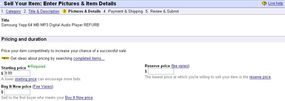
You have to put a number on it. Specifically, you need a starting price, a “Buy it Now” checkbox, and a duration for the auction.
The Samsung Yepp YP-30S isn’t exactly a rare artifact. New models go for about $90. Refurbished units? Closer to $40. But this one? You don’t know if every button works. The screen might be dead. The battery might swell.
So you start low. $9.99.
It sounds counterintuitive to undervalue your gear. But there is method to the madness.
First, it lowers the barrier to entry. Buyers hesitate when condition is unclear. A cheap entry price makes the risk feel manageable.
Second, you open the door to the cannibals. There are people who buy broken tech just to harvest parts. You might not get the full player price. But you’ll get some price from someone who wants the casing or the logic board.
Third, there is the fee structure. eBay takes a cut of the listing. A lower starting bid can shave off those costs. Every dollar saved on fees is a dollar kept in your pocket.
Does the buyer care about your fees? No. But you care. And in this game, margins matter more than pride.
The Cost of Silence
Reserve prices are a tax on uncertainty. They are the lowest number you will accept, period. But they are expensive. Unless you are moving high-value inventory, they do not make sense. Starting an auction at your absolute floor price triggers massive listing fees. That is bad math.
The alternative is cheaper. You start low. You pay a small fee to set the reserve. The market decides the rest.
We skipped the Buy It Now option entirely. Auctions are fun. We like the chaos of it. We are sticking with the standard 7-day auction. It starts the moment the listing goes live. No delays. No waiting for a buyer to click a button. Just time ticking down.
Reserving a price protects your bottom line but taxes your upside.
Visuals First
Scroll down. Ignore the pricing for a second. Look at the image slot.
This is where you add a picture.
Keeping it lean with eBay Basic Picture Services
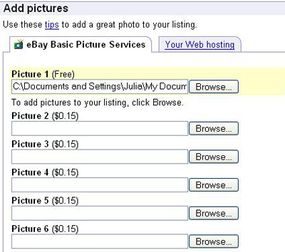
You only need one photo? Use eBay Basic Picture Services. The first image loads for free. You just click “Browse,” find the file on your drive, and double-click it. Done.
If you’re listing a handful of items occasionally, this is the smart move. But if you’re pushing fifty sales a week, hosting images elsewhere starts looking cheaper. Weigh the cost against your volume.
Skip the bells and whistles.
The next section offers paid upgrades. You can buy bold titles. Fancy frames. A spot in the “Featured Items” box right at the top of search results. We’re skipping those. Every extra fee bumps up your costs. We want to keep the listing price low, not pay for decoration.
Setting up payment and shipping terms
Next comes the logistics. Payment methods. Shipping fees.
For simplicity, we’re locking this to PayPal. It’s easy. It’s standard. (And yes, the author already has an account set up.)
Shipping is where things get tricky. You have options.
- Estimate upfront. Tell the buyer exactly what shipping will cost before they bid. No surprises.
- Calculate later. Wait until you win and know the buyer’s zip code. Then send the invoice.
- Use a calculator. Let the buyer type in their zip code. The system figures out the exact charge.
You can use any carrier. U.S. Postal Service. UPS. FedEx. Or you can let the buyer choose the method after the auction ends.
Finalizing the rules
At the bottom of the page, you set your return policy. Add any extra payment instructions if needed.
That’s it. The structure is in place. The rest is just details.
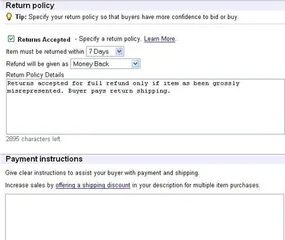
Verify the final details before you pay
Before you commit, take a look at the summary page. This is your last chance to catch any typos or wrong pricing. If something looks off, go back. Edit it. Check it again. Don’t rush this part. The bottom of the screen will show the total listing fee. That number is final. No hidden charges. Just what you agreed to. Make sure it matches your budget. Then click through.
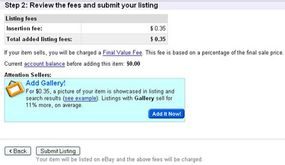
The hidden cost of every click
The listing isn’t free. Even if you don’t see a price tag upfront, eBay collects an insertion fee of $0.35 for starting prices between $1.00 and $9.99. We didn’t pay for any extra features. Just the base rate.
When the buyer finally clicks “Buy,” the real cost kicks in. That’s the final-value fee. For this MP3 player, if it sells for $25.00 or less, you pay 5.25 percent of the final sale price. It’s a small percentage, but it adds up fast.
How eBay seller fees are structured
For a complete list of seller fees, go to eBay.com Fees.
Once we’re satisfied that everything is correct, we officially submit the listing. Since we chose to start the listing immediately, it immediately shows up on the eBay Web site:
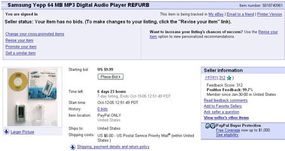
The blue background area we see in our seller dashboard is internal only. We can tweak the listing anytime using “Revise your item,” provided the auction hasn’t ended and no bids exist yet. The clock must have at least twelve hours remaining.
If someone places a bid before the seven-day timer runs out, we have a buyer. It’s that simple. When the auction closes, eBay generates an invoice. This is a one-click workflow. We navigate to the auction page or check the sale confirmation email. We click “Send Invoice.” Then we add any missing payment details. Finally, we hit send.
Once PayPal confirms the electronic payment, we ship the item. It goes to the buyer’s confirmed PayPal address. We also leave positive feedback immediately. The goal is for them to reciprocate once the MP3 player arrives. It should match the description exactly.
Why Feedback Matters More Than You Think
Feedback is the primary filter for bad sellers. It validates the good ones. But eBay is massive. Thousands of transactions happen daily. Everything relies on static images and text. Fraud happens. Scams happen. We need to understand common schemes to protect ourselves.
Second Time’s the Charm: The Relisting Strategy
Our first attempt failed. Zero bids. Don’t panic. We can relist the item. If it sells the second time, the relisting fee is waived. We still pay the final-value fee, though. If it fails again, we pay another $0.35 listing fee.
What went wrong? Look at the numbers. On October 24, 2005, the “MP3 Players” category held nearly 17,000 listings. High-volume sellers flooded the market. They listed brand-new, high-gigabyte units. Their starting price was $0.99.
We were selling an ancient, refurbished device. It was a gamble. Competing with those prices was futile. Adding paid features like bold-face type or gallery status didn’t make financial sense for a low-value item. So we changed tactics.
For the second listing, we trimmed the title. Clarity over keyword stuffing. We dropped the starting price to $4.99. The description was sharper. We explicitly stated that basic functions worked.
It worked.
Three bids from two different users. The final sale price? $15.50.
Sometimes you just have to lower the bar to get over it. The market is ruthless. But it’s also predictable if you stop fighting the algorithm and start talking to the buyer.
eBay Fraud: Navigating Security Risks and Recourse
Anonymity makes the internet a playground for scammers. eBay is no exception. It mirrors the wider web: anyone can pretend to be anyone else. But don’t let the mask fool you. eBay usually knows exactly who is behind the username. Most fraud victims actually have recourse. The system isn’t perfect, but it has teeth.
Buyers feel safer when they know their money is protected. eBay automatically insures tangible items for up to $200. This doesn’t cover digital goods. A recipe sent via email isn’t a tangible item. But if you buy speakers that never arrive, you have options. If the dispute process confirms fraud, you can get your money back. The cap is $200.
Using PayPal changes the stakes. Incentivizing this payment system, most items bought through PayPal are covered up to $1,000. That’s a significant safety net for high-value purchases.
Buyer Fraud: The Non-Paying Bidder
Buyer fraud is usually less damaging than seller fraud. The most common offense? Simply not paying for the item. Sellers aren’t powerless here. They can file an Unpaid Item dispute. eBay steps in to contact the buyer.
If the buyer ignores eBay’s attempts for eight days, the seller gets a win. They are reimbursed for eBay’s cut of the final sale price. They can also relist the item for free. It’s a clean resolution.
If the buyer responds, the outcome varies:
- The buyer pays. Everyone is happy.
- Both parties agree to abandon the transaction. The seller gets reimbursed for the final-value fee and relists for free.
- The seller refuses to deal with the buyer. The buyer gets an unpaid-item strike. The seller still gets reimbursed and relists for free.
The damage to the seller is minimal. Another form of buyer fraud involves false payments. Bounced checks are common. Sellers often discover this before shipping. Many choose to reject personal checks entirely. It’s a risk they’re not willing to take.
To avoid buyer fraud, check the feedback of your bidders. Excessive negative feedback is a red flag. You can cancel the bid if the history is bad. If you accept a personal check, never ship merchandise until the check clears. If a buyer doesn’t pay, always leave negative feedback. It makes it harder for non-paying bidders to strike again.
Seller Fraud and Miscommunication
Seller fraud is what keeps buyers awake at night. There are two main ways this happens. The item is dramatically different from the description. Or it never arrives at all.
Before assuming malice, consider miscommunication. It’s rampant on eBay. You might have missed a detail in the auction listing. Did the seller mention they’d be out of town for three weeks? That could explain why your item hasn’t arrived and why they aren’t answering emails.
Email is also a flawed medium. If your item hasn’t arrived after two weeks, check your junk mail. The seller’s response might be sitting there. If it’s not in your inbox or junk folder, you have a problem.
You can request that eBay reveal your seller’s phone number. A direct call might clear things up. If there’s no answer, or if international calling costs are prohibitive, start the dispute process.
When you believe you’ve been defrauded, file a complaint. eBay acts as a middleman. They try to settle the dispute between you and the seller. But there are layers to this.
If you used PayPal, file a complaint there first. Your item is likely covered under PayPal’s buyer protection policy. That’s a separate system. When filing in eBay’s “Item Not Received or Significantly Not as Described” system, eBay mediates. If that fails, you can file a claim for reimbursement.
However, if you paid by credit card, you need to file a claim with your credit card company first. eBay won’t reimburse you if your card company is willing to. Always prioritize the strongest protection available to you.
To avoid seller fraud, check feedback before bidding. Ask all relevant questions beforehand. Some sellers omit condition details, assuming the buyer will read between the lines. If the item turns out to be junk, the buyer often bears the brunt of that assumption. Always leave negative feedback for unscrupulous sellers. It creates friction for their future fraud.
Fake Escrow Services
Escrow sounds safe. It adds a layer of verification. But fake escrow services exist. Both buyers and sellers can be defrauded by them. These services mimic the real thing. They look legitimate. They steal the money instead of protecting it.
For expensive purchases, relying on unofficial escrow is a gamble. See eBay Help: Using Escrow to learn about the safest way to use escrow. The internet is full of shortcuts. Sometimes taking the long way around is the only way to keep your money.
eBay Spoofing and Off-Site Fraud
Most fraud on eBay happens inside the platform. But there’s a darker side that lives outside its servers. You get an email. It claims to be from eBay. It demands you update your account info.
Don’t click.
This is identity theft via spoof emails. Most people know this as phishing. The scam is simple. The execution is often sloppy. The email says your credit card on file is invalid. It threatens to lock you out of the site unless you act now.
Some emails include a form right in the body. Others offer a link. The link looks real. It might even have a familiar URL structure. But it’s not eBay. It’s a fake site. You type in your password. You type in your card number. The scammer takes it all.
PayPal suffers the same fate. If you see these emails there too, treat them with the same suspicion.
How to Spot a Fake
Avoiding this is straightforward. You just have to know the rules.
eBay never puts account forms inside emails. Ever. If you see one, it’s fake.
The links are also a dead giveaway. Hover over them. Look at the address bar. If the domain doesn’t match eBay exactly, close the window.
There is a tool that helps. The eBay security toolbar. It flags fake sites instantly. You can also follow the spoof email tutorial for a full breakdown.
But what if you already fell for it?
Damage Control
If you submitted your details on a fake form, act fast.
Cancel the credit card immediately. Change your eBay password. Now.
Why? Because they don’t just want your money. They want your identity. They can use your credentials to sell fake goods. They can cheat other buyers. Your reputation gets trashed in the process.
There’s another trap. Some sellers ask you to pay outside eBay’s checkout system. These are usually high-volume sellers with thousands of positive reviews. They have their own payment forms.
But check the feedback number. Low feedback? Walk away.
Preventive Steps
- Recognize the signs of a spoof. Check everything before entering data.
- Report spoof emails to eBay. They investigate these incidents.
- Scrutinize seller feedback before using private checkout forms.
eBay is still a viable place to shop. Millions use it daily without issues. The platform is thriving. But you have to stay sharp.
The business side of eBay is complex. Its origins are interesting. The competition is fierce. We’ll look at that next.
Related Resources
- Security & Resolution Center
- Spoof Email Guide
- Discussion Boards
- Answer Center

Pierre Omidyar didn’t set out to build a retail giant. He was just a computer programmer in 1995 who wanted a place for people to sell collectibles. The legend says he built AuctionWeb because his girlfriend needed to offload her Pez dispenser collection. The reality is slightly more technical. Omidyar saw the raw potential of the early web. He knew the internet could connect buyers and sellers in ways physical markets never could. The Pez story was just the spark that revealed the mechanics of a bidding system.
He promoted the site through Usenet groups. The early inventory was bizarre. A pair of underwear signed by Marky Mark. A 1967 Superman lunchbox. An old Sun-1 workstation. A 35,000-square-foot warehouse in Idaho. And Omidyar’s own broken laser printer, which sold for $14. By 1996, AuctionWeb had evolved into what we know as eBay.
The numbers tell a story of explosive growth. In 2004, the platform hosted 1.4 billion listings. $34.2 billion changed hands. That’s not pocket change. It’s an economy.
The Acquisition Strategy and Storefronts
eBay didn’t just grow organically. It bought growth. In September 2005, it acquired Skype for $2.6 billion. The global VoIP service had 54 million customers at the time. It was a strategic move to integrate communication into transactions. eBay also owned PayPal.com, Half.com, Shopping.com, Kijiji.com, ProStores.com, and Rent.com. It held a 25 percent stake in Craigslist. By every financial metric, the business was thriving.
The real shift in consumer behavior came with the rise of eBay stores. Sellers could create storefronts that looked like independent websites. They still paid listing fees and a cut of every sale. But they gained a professional presence. A 2005 survey highlighted the economic impact. Approximately 725,000 people in the US earned all or part of their income from eBay sales. Another 1.5 million used it for extra cash.
This demand spawned an entire ecosystem of auction-related software. Developers created tools to find misspelled listings, allowing users to win items for less than their market value. Sniper programs automated bids, placing them in the final seconds of an auction. Other applications sent alerts to cell phones or PDAs when outbids occurred or auctions were ending soon. Brick-and-mortar consignment shops also emerged, selling unwanted items on behalf of clients who didn’t want to deal with the hassle.
Competition and Legal Liabilities
eBay wasn’t the only player. Yahoo!, Amazon, and Overstock ran their own auction services. uBid.com, AuctionFire.com, and PoliceAuctions.com (for government-seized property) competed for traffic. Dozens of fledgling sites offered free listings to poach customers. None matched eBay’s scale.
With almost 5 million new listings per day, oversight was impossible. This created legal gray areas. In 1999, eBay cancelled an auction for a human kidney that had reached $5.7 million. It also pulled listings for large firearms, including a rocket launcher and a bazooka. The company prohibited human body parts and firearms. But what is its liability if such an item slips through?
The user base had grown from 6 million registered users in 1999 to 150 million. The scale made enforcement a nightmare. As of October 2005, eBay faced potential fines over the alleged sale of prescription contact lenses. Prescription drugs and devices were on the prohibited list. But proving intent and stopping the flow of goods was difficult.
Some analysts worry this sheer reach will eventually become its downfall. The platform’s size makes it a target for regulation and litigation. For now, it remains the poster child for internet success. But the next big legal challenge is waiting in the comments section of a thousand-item listing.