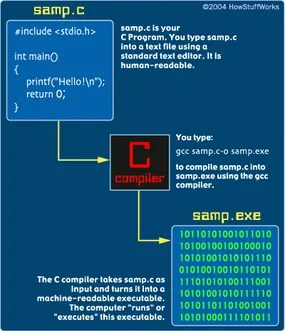
You are about to write code. Not pseudo-code. Not a script. Real C. It is terse, it is old, and it is everywhere. If you have ever used an operating system, a database, or a web server, you have likely touched the bedrock that C provides. The first step is not learning complex algorithms. It is setting up the file correctly and making sure the compiler does not reject you before you even begin.
Open your preferred editor. If you are on Linux or macOS, vi or emacs are standard choices. Windows users might reach for Notepad, though I would argue a proper code editor is safer. Mac users have TeachText, though that feels archaic even now. The goal is simple text output. No rich formatting. No hidden metadata. Just raw characters.
Save the file as samp.c. This is critical. The compiler expects a C source file to end in .c. If you save it as samp or samp.txt, the compiler will likely throw an error or fail to recognize the language syntax. Some editors try to be helpful by appending .txt automatically. Turn that feature off. You need a clean filename.
Here is the entire program. It is small. It is complete. It does one thing and does it well.
Let us break down what is happening here, because the syntax looks alien if you are coming from Python or JavaScript.
First, the line #include . This is a preprocessor directive. It tells the compiler to include the Standard Input Output header file before compilation. stdio stands for Standard I/O. This file contains declarations for functions like printf, which you will use to print text to the console. Without this line, the compiler will not know what printf is, and the build will fail.
Next is int main(). This is the entry point of every C program. When you execute the program, the operating system looks for this function to start. The int indicates that the function returns an integer. The main() name is hardcoded by convention. You cannot change it if you want the program to run standardly.
Inside the curly braces {} is the body of the function. There is one statement here:
printf("This is output from my first program!\n");
printf is a function that writes formatted output to the standard output stream (usually your terminal). The string inside the quotes is what gets printed. Note the \n at the end. This is an escape sequence for a newline character. Without it, your prompt might appear on the same line as your output, making the terminal look messy. The semicolon ; at the end terminates the statement. C is strict about this. Miss the semicolon, and the compiler will complain.
Finally, return 0;. This exits the main function and returns the value 0 to the operating system. In C, a return value of 0 traditionally means “success.” A non-zero value indicates an error. It is a simple contract between your program and the
The code is brutally simple. It tells the machine to print “This is output from my first program!” and then walk away. No loops. No complex logic. Just a print statement and an exit.
Getting that string onto your screen requires one step: compilation. How you do that depends on the machine you are using.
UNIX Compilation Steps
On a UNIX system, you are working in the terminal. You type:
gcc samp.c -o samp
This invokes the GNU C Compiler (gcc ). It takes the source file samp.c and converts it. The -o flag tells the compiler where to put the resulting executable file. In this case, you are naming it samp.
If gcc is not recognized on your specific machine, try using cc instead. It might be linked to a different compiler backend.
Once the compilation finishes without errors, you run it. Type:
samp
Or, on some systems where the current directory isn’t in your execution path, you might need to type:
./samp
DOS and Windows Compilation Steps
If you are on a DOS or Windows machine using the DJGPP environment, the process is similar but the file extensions differ. At the MS-DOS prompt, you type:
gcc samp.c -o samp.exe
Again, gcc is the compiler. It processes samp.c. The output executable is named samp.exe.
To run it, you simply type:
samp
The .exe extension is optional when running the command in DOS, but it is necessary for the file to be recognized as an executable by the operating system.
Other Compilers
You might not be using gcc. You could be using a proprietary IDE or a different compiler entirely. The command line syntax will change.
Read the documentation for your specific development system. Follow the instructions for compiling and executing C programs. The logic remains the same: source code in, executable out, run executable.
Debugging Typos
You will likely make a mistake. The compiler is unforgiving of syntax errors. If you mistype the program, two things can happen:
- It will not compile. You will get an error message.
- It will compile, but it will not run correctly. You might get a runtime error or garbage output.
If it doesn’t work, edit the code. Find the typo. Fix it. Try again. This cycle is part of learning C.
Positioning and Formatting
Syntax is strict, but whitespace is flexible. There is one critical rule regarding position.
You must position the #include directive so that the pound sign # is in column 1. The far left side. No spaces before it.
If you indent this line, the preprocessor might not recognize it. The rest of the code? Spacing and indentation are up to you. The compiler ignores extra whitespace.
On some UNIX systems, you can use a tool called cb, the C Beautifier. It will format your code automatically. It enforces consistent indentation and spacing.
Follow the indentation style shown in the source code. It is clear and readable. Use spaces or tabs. Just be consistent.