It has been more than twenty years since Microsoft dropped Windows Movie Maker onto the scene. In an era where video editing software often demands high-end hardware and a steep learning curve, this free tool stood out. It was simple. Intuitive. A reference point for anyone who wanted to cut video without paying a dime.
Built into older versions of Windows, from XP through Windows 7, it eventually moved to the Windows Essentials 2012 suite before Microsoft officially ended support in 2017. Despite its retirement, the demand hasn’t faded. Why? Because for quick family montages, educational presentations, or simple social media clips, you don’t need Adobe Premiere Pro. You just need something that works.
Why Windows Movie Maker Still Matters
Let’s be clear about what this software does. It doesn’t handle 8K raw footage. It won’t color grade a feature film. But if you are a beginner, or just someone who needs to trim a clip and add music, it is surprisingly effective.
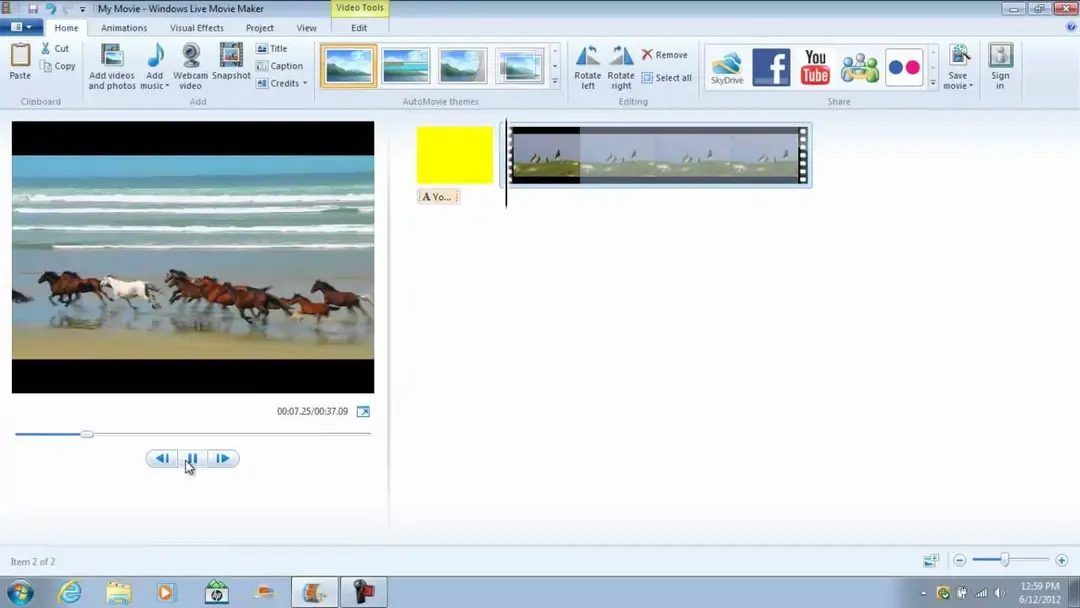
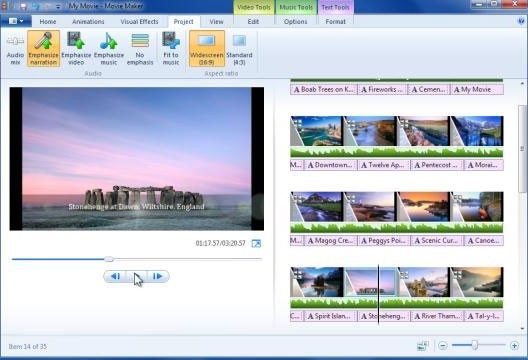
The interface is stripped down. You import clips. You drag them onto a simplified timeline. That is the core of it. From there, you can:
– Cut and split sequences.
– Adjust the duration of specific shots.
– Add transitions between scenes.
– Insert titles, credits, and visual effects.
– Overlay a musical soundtrack.
Customization is limited but present. Pre-defined filters and themes give projects a polished look without requiring technical know-how. It bridges the gap between no editing and professional editing. For many users, that middle ground is exactly where they need to be.
Integration with Microsoft services like OneDrive and Outlook also smooths out the sharing process. You create, you save to the cloud, you send via email or link. No complex export settings to worry about. This accessibility is why it remains a viable option for schools, associations, and home users who refuse to subscribe to monthly software suites.
The Hard Truth About Downloading
You are likely searching for a direct download link right now. Here is the reality check: Microsoft stopped distributing it officially years ago. You cannot find it in the Microsoft Store. You won’t get updates. Security patches are a thing of the past.
So, where do you get it?
The most stable and evolved version is Windows Live Movie Maker 2012. It is the last official release. To get it, you have to look at trusted archives or reputable tech sites that host the installer. Sites like Futura-Sciences have been known to host authentic, safe versions. Avoid shady “cracked” sites. They often bundle malware. The installation process is straightforward, but you must be vigilant.
During setup:
– Select only the components you actually need.
– Decline any third-party software offers. They are almost always junk.
– Verify the source. If a site asks for personal data or payment, close the tab.
Remember, the official editions were always free. There was never a “Pro” or “Student” license. Any website selling “Premium” versions of Movie Maker is running a scam. It is a free tool. Treat it as such.
Compatibility: What Runs on What
This is where Movie Maker shows its age, but also its stubborn resilience. It was built for a different era of computing.
Windows XP through Windows 7: These are its native homes. It runs perfectly here.
Windows 8 and 10: It works well on these systems too, though some users report minor glitches with newer codecs or hardware acceleration.
Windows 11: Surprisingly, it often still functions on Windows 11, especially if you are using a 32-bit environment or tweaking compatibility settings. However, Microsoft does not guarantee it. You are on your own for troubleshooting.
It is important to note that Movie Maker is a Windows-only application.
– No macOS: Apple users are out of luck. There is no port.
– No Linux: Open source users must look elsewhere.
– No Mobile: It does not exist on Android, iPhone, or any other mobile OS.
If you are on a Mac, iMovie is the logical alternative. It is free, pre-installed on most Macs, and surprisingly powerful for casual editing. Linux users have robust open-source options like OpenShot or Shotcut. These tools handle similar tasks with more modern features and better performance on current hardware.
Who Is This For?
You should consider using Windows Movie Maker if:
– You have an older PC with limited RAM or processing power.
– You need to edit videos quickly without learning complex timelines.
– You are on a strict budget and cannot afford subscription software.
– You are working in an educational or non-profit setting where cost is a primary concern.
You should avoid it if:
– You need advanced audio mixing or color correction.
– You are editing high-resolution (4K/8K) footage.
– You rely on cloud-based collaboration features found in modern SaaS tools.
– You are on a Mac or Linux machine and don’t want to dual-boot or use a VM.
The software is a relic, yes. But relics often hold value. It represents a time when software was designed for utility, not for locking you into an ecosystem. For those who remember it, or who stumble upon it now, it offers a specific kind of freedom. No nagging pop-ups. No trial expiration dates. Just you, your footage, and a timeline.
Is it the best option in 2024? Probably not. Is it still a functional tool for basic tasks? Absolutely. Just make sure you know where you are downloading it from. The internet is full of traps for users looking for old software. Stick to trusted archives. Keep your system secure. And if you find yourself needing more power, you will eventually graduate to something newer. But for now, the old king still sits on its throne, waiting for one last edit.
Where Movie Maker Fits in the Free Video Editing Landscape
Most free video editors try to be everything to everyone. DaVinci Resolve, HitFilm Express, and Shotcut are powerful. They are also heavy. They have steep learning curves. If you want color grading, multicam editing, or complex special effects, you need that weight. Windows Movie Maker does not have that weight. It is stripped down. Simple.
This simplicity is its primary feature, not a bug. It creates a low barrier to entry. A beginner can open the software and start cutting clips in minutes. There is no manual to read. There is no interface to decipher. You drag. You drop. You finish.
However, this lack of depth has limits. Movie Maker cannot handle professional workflows. It lacks multi-track audio mixing. It does not support multicamera setups. You cannot export to ProRes, MXF, or other broadcast-standard codecs. It supports AVI, WMV, and MP4. That is it.
So where does it belong? It belongs in homes, schools, and small associations. It is a tool for casual creation. If you want to make a video for TV or cinema, you need Adobe Premiere Pro, Final Cut Pro, or Avid Media Composer. Movie Maker is for the rest. It is lightweight. It is fast. It opens common formats without complaint.
The Post-Official Community and Learning Resources
Microsoft stopped supporting Windows Movie Maker. The software is dead in the eyes of the manufacturer. But the community did not die. An ecosystem of tutorials, forums, and resources has grown around the tool. These resources are free. They are accessible on major platforms.
Some schools and libraries still teach Movie Maker. They use it to introduce digital media literacy. The focus is on storytelling. It is about visual narrative. It is about learning how to manage digital files. This approach democratizes video creation. It proves that the tool still has value years after its commercial end.
The community is active. It is loyal. Users rely on the software because it is predictable. It is reliable. It does not change. For many, that stability is more important than new features.
Version Management and Legacy Support
Users often ask about updates. There are none. Microsoft no longer releases patches. You cannot force an update. The software does not connect to an update server like modern apps. The final version is Windows Movie Maker 2012. This version includes all the improvements Microsoft made over the years. It has better format support. It is more stable. It works better on newer Windows systems than the old XP-era versions.
Some users need older versions. Maybe they have old project files. Maybe their hardware is too weak for 2012. You can find old installers online. This is useful for retro-compatibility. It is necessary for restoring old media.
But there is a risk. Old versions are less secure. They may not work on modern operating systems. They can crash. They can corrupt files. Using 2012 is safer. It is the recommended choice for most users.
Training Without Certification
There is no official Microsoft certification for Movie Maker. You cannot get a certificate from Microsoft to prove you know the software. This does not mean there is no training. Many online modules exist. They teach the basics. They cover video narrative. They explain simple post-production techniques.
These resources help users become independent. They encourage creativity. They are available online or through local training centers. They fill the gap left by the lack of official support.
Why Movie Maker Still Matters
The market for video editing has changed. New tools are more powerful. They are more complex. But Movie Maker remains a reference point. It is accessible. It is simple. It works.
It helps beginners. It helps experts who need a quick tool. It supports creative projects that do not require broadcast quality. It remains relevant because it solves a specific problem: easy video creation for non-professionals.
Is there a better way? Maybe. Is there a simpler way? Probably not. The software is a relic. But relics have value. They remind us that technology does not always need to be complicated to be useful.
The debate continues. Professionals will dismiss it. Enthusiasts will defend it. The truth is somewhere in the middle. Movie Maker is not for everyone. But for the people who need it, it is still the best option.
What happens when the last computer running Windows XP finally dies? The software will remain. It will be archived. It will be studied. It will be remembered. Not for its features. But for its impact. It made video editing possible for millions of people who never thought they could do it. That is a legacy.
Windows Live Movie Maker 2012 technical specs breakdown
It’s still there. Buried under layers of legacy code and discontinued support, the final standalone version of Windows Live Movie Maker 2012 remains a functional, free tool for anyone who needs to stitch clips together without paying a subscription.
It’s not a professional suite. Don’t expect keyframing curves or advanced color grading. But for home videos, school projects, or quick social media cuts, it holds up. The architecture is 32-bit. Yes. That sounds archaic, but it runs smoothly on 64-bit systems from Windows XP through Windows 11. Microsoft didn’t drop it for a reason. It’s lightweight. It doesn’t hog RAM.
Installation isn’t a standalone download anymore. You need the Windows Essentials 2012 package. It’s an offline installer. You can cherry-pick components. Turn off Photo Gallery if you only want video editing. No bloat. No third-party toolbars sneaking in. Just the core engine.
Supported formats and export limits
The media handling is conservative. It plays nice with the formats you actually have on your hard drive.
- Import: MP4 (H.264), WMV, AVI. Audio tracks in MP3, WMA, WAV. Images? JPG, PNG, BMP. Standard stuff.
- Export: MP4 (H.264) and WMV. Max resolution is 1080p. Full HD. That’s the ceiling.
You don’t need internet to edit. The timeline works offline. The preview renders locally. But if you want to push that finished video to OneDrive or share it directly to social platforms, you’ll need a connection. The cloud integration is sparse, but functional.
Hardware reality check
Microsoft lists no strict minimum specs. That’s typical for software that’s essentially dead. In practice, it runs on almost any PC made in the last decade. DirectX 9 compatibility is the baseline. If your graphics card can handle a modern desktop interface, it can handle Movie Maker. No dedicated GPU required.
The interface is localized. French is well-supported. Multilingual options are standard for Windows Essentials.
Why this still matters
The software is gone from official channels. Microsoft killed it. But the installer persists on archive sites. Is it safe? Only if you verify the source. Authentic installers don’t bundle adware. Fake ones do. Stick to verified mirrors.
This isn’t just nostalgia. It’s about accessibility. For users on older hardware, or those who refuse to pay for cloud-based editors, Windows Live Movie Maker 2012 offers a zero-cost solution. It lacks the polish of modern apps. It crashes occasionally on complex projects. It doesn’t support 4K.
But it works. And sometimes, that’s enough.
The timeline is simple. Drag. Drop. Cut. Add music. Export. No learning curve. Just results.
You can still find the download. But you have to look for it. It’s not on the Microsoft store. It’s not in the start menu. It’s a ghost in the machine. And for some, that’s exactly what they want.