The rise of AI-driven productivity tools has shifted the focus from how we type to how we speak. While software-only dictation apps like Wispr Flow or Typeless are becoming commonplace, they often rely on a smartphone’s built-in microphone, which can struggle with clarity and distance. This gap in the market is where SpeakOn, a new hardware entrant from Notta, attempts to make its mark.
A Dedicated Tool for Voice-to-Text
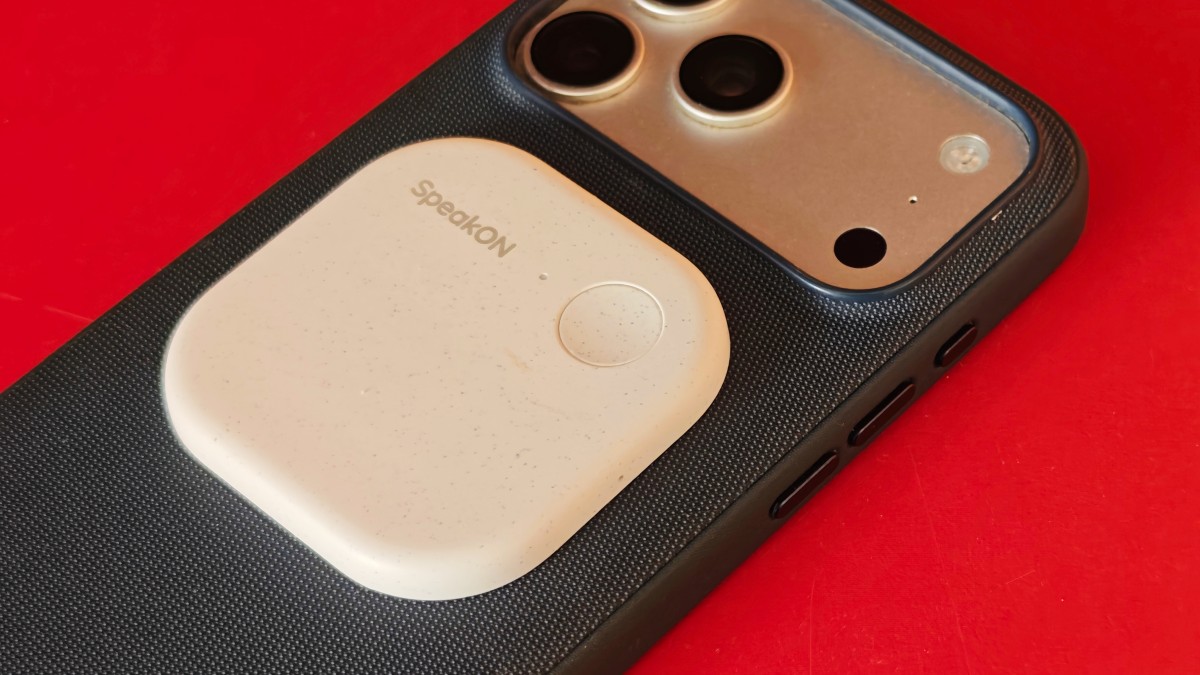
SpeakOn is a compact, pebble-sized device weighing just 25 grams. Designed for convenience, it attaches to the back of an iPhone via MagSafe, much like the popular Plaud AI notetaker.
Unlike standard dictation apps that hijack your phone’s microphone, SpeakOn utilizes its own dedicated hardware. The workflow is straightforward:
– Simple Operation: Press the button to start dictating and release it to finish.
– Seamless Integration: The device works within any app, provided the software keyboard is active.
– AI-Enhanced Output: The companion app automatically filters out filler words and can format speech into structured lists.
– Multilingual Support: Beyond transcription, the device offers real-time translation for a wide range of languages, including English, Japanese, Spanish, French, and Arabic.
Hardware and Software Hurdles
Despite its clever design, the device faces significant challenges regarding performance and user experience.
🎙️ Microphone and Audio Quality
While the device aims to capture audio within a two-foot radius, real-world testing suggests it struggles with environmental noise. To get reliable results, users often have to hold the phone quite close, somewhat defeating the purpose of a hands-free dedicated peripheral.
🤖 The “Over-Editing” Problem
SpeakOn includes an AI feature designed to adjust the “tone” of your speech. However, this can lead to unnatural results. The AI occasionally replaces simple, direct language with overly formal alternatives—turning “Sure, no worries” into “There is no need to be concerned.” For many users, this “forced” editing feels unnecessary, requiring them to manually disable the tone-changing features to maintain their natural voice.
📱 Platform Limitations
A major friction point is the device’s current ecosystem. Because it relies on a custom iOS keyboard, users are tethered to the iPhone. The lack of macOS compatibility prevents it from being a truly universal tool for professionals who dictate across both mobile and desktop environments. Furthermore, system-level restrictions on iOS make it difficult to trigger the dictation keyboard without manual switching.
Battery and Value Proposition
SpeakOn claims a 10-hour active battery life and a 20-day standby time. However, practical usage shows that the standby time is significantly shorter, likely because the device remains in a “never-off” default state. On the bright side, the device supports rapid charging, reaching 100% in just one hour.
Pricing Structure:
– Device Cost: $129
– Free Tier: Up to 5,000 words per week (offering more than many competitors).
– Premium Tier: $12 per month for unlimited words.
The Verdict
SpeakOn holds an “early mover” advantage by being one of the first to hardware-enable the dictation experience. However, to capture a larger market share, it must move beyond its current limitations. Success will depend on improving microphone sensitivity, refining the AI’s linguistic subtlety, and expanding support to desktop platforms.
Conclusion: SpeakOn offers a compelling vision for hands-free productivity, but it currently feels like a prototype trapped by software constraints and hardware inconsistencies.