June 2026. Google drops the Pixel update.
Air lands. Older Pixels get it. Magic Cue gets smarter about chat apps. The Android 17 build? Actually stable. No major bugs. A rare joy.
I flashed it on my Pixel 10 this morning. Expected the usual tinkering. Got a feature called Bubbles. Now I can’t stop using it. It’s the multitasking fix Android has been missing.
Usually Google is all talk about Gemini Intelligence. Last year’s Android 16 was a bug-fest that frustrated everyone. This time though, they delivered.
Here’s how it works. You press an app. It floats. A bubble on your screen. An overlay. Sounds useless when you can just open an app full-screen? Try it. You’ll change your mind.
The floating workflow
It’s not just one window. It’s a stack.
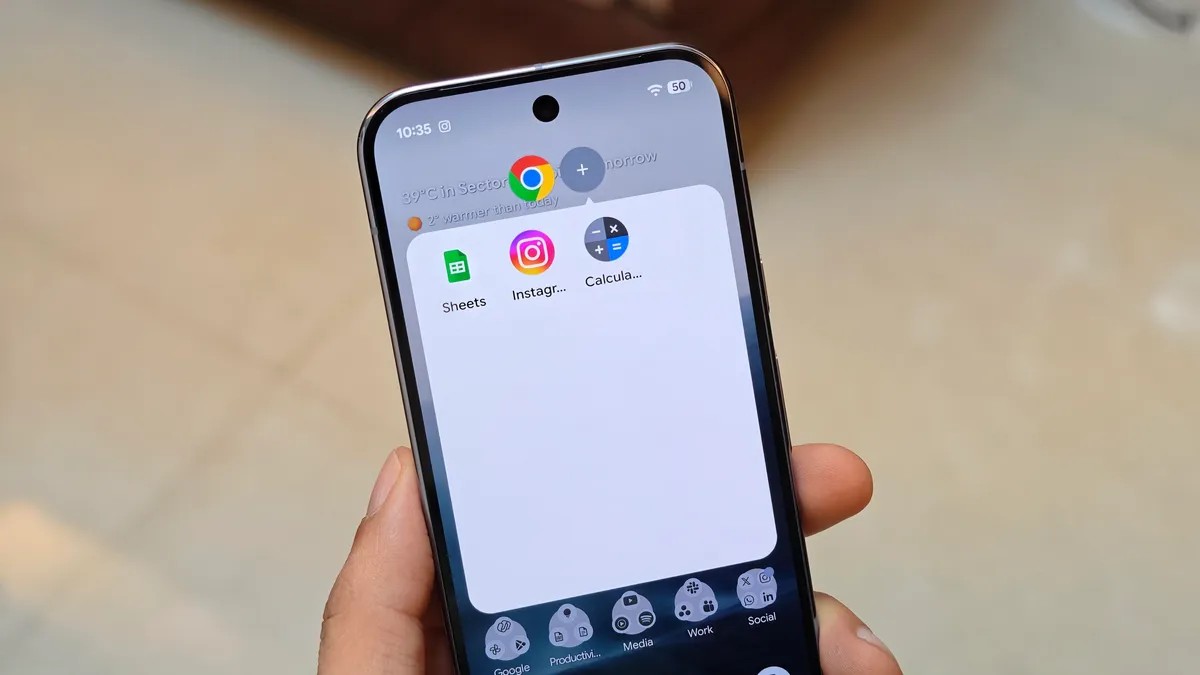
Bubbles let you group apps into floating windows that eat up most of your view. Long press an icon. Tap Bubble. Boom. New window. Add more apps. A floating taskbar appears at the top. Swiping through apps at the bottom feels archaic now.
I needed to fact-check a tech rumor from an Instagram Reel yesterday. I bubbled up Instagram. Added Chrome for searching. Added Keep for notes. Everything right there. One screen. Fast. I still prefer my foldable for this. Having multiple full apps open simultaneously on a slate screen beats any overlay.
But most people aren’t carrying a foldable. Bubbles saves the traditional 6.3-inch phone from itself. Split-screen used to be the only option. It always felt cramped. Claustrophobic even.
Samsung tried pop-up views in One UI. They work. Android’s version feels smarter. Thoughtful even. I sent two weeks of invoices today. My usual workflow requires three Google Sheets. A Google Doc. The Calculator.
Previously. I’d open one. Close it. Open the next. Repetitive. Painful. With Bubbles I kept all three Sheets open. Separate pop-ups. Plus the Doc and Calc. I tapped between them. Instantly. No closing. No reopening.
The best part. Android remembers. You don’t repeat the long-press dance. The system bundles your frequent apps together. One tap brings back your usual crew. Swipe up to minimize them into a tiny icon. Tap to restore. Swipe away into an X to delete. Simple.
It’s so intuitive I forgot how hard I tried to work around Android’s limitations before. I just want to pin these groups to the home screen. Folders for “Research”. Folders for “Billing”. That would be the final piece of the puzzle.
Bubbles is the multitasking upgrade I didn’t know I needed.
How to activate it
It’s live on compatible Pixels now.
Go to Settings.
Find Notifications. Tap Bubbles under Conversations. Turn the toggle on. Allow apps to bubble.
Then:
- Press and hold any app on your home screen or drawer.
- Tap the Bubble icon in the corner.
- If you see a list instead, pick the Bubble action from there.
- Repeat for more apps.
- Later, just tap the plus sign to add them faster.
When you’re done working swipe up. Grab the floating icon. Drag it to the X to close it all down.
I’m still poking at Android 17. It feels different. Productive even. I used to pull my hair trying to keep two tabs and a doc open on a narrow screen. Now I just tap. And watch the apps float. It works. Maybe it will keep working. Maybe I’ll find a flaw soon enough.